Stylus 2M Red
Color: Red.
2M body group: Red / Blue / Silver.
1.8 g recommended · 1.6–2.0 g range
Ortofon photo & stylus specification ↗Sheet 07 · Setup and service
How to set up, calibrate, maintain and buy a 1200, from the factory manual and the people who service these decks for a living.
Set the force for the needle, not the body. Every M44 body takes either stylus, so an M44-7 with a gray N44G in it tracks like a G. You'll also see the G written M44-G. Shure interchangeability chart ↗
The G is the light, quieter hi-fi needle. The 7 is louder and built to sit heavy in the groove; Shure's own DJ setup says 3 g, the 7's typical figure. Shure DJ setup ↗
| Spec | N44G | N44-7 |
|---|---|---|
| Grip color | Gray | White |
| Output (1 kHz, 5 cm/s) | 6.2 mV | 9.5 mV (about 3.7 dB louder) |
| Tracking force | 0.75–1.5 g, typical 1.5 | 1–3 g, typical 3 |
| Tip | Spherical, 0.6 mil (1972) or 0.7 mil (current) | Spherical, 0.7 mil |
| Frequency response | 20–20,000 Hz, or 20–19,000 Hz | 20–20,000 Hz, or 20–17,000 Hz |
| Body it ships in | M44G | M44-7 |
Shure contradicts itself in a few places, so both figures are shown. The 1972 stylus guide gives the G a finer 0.6 mil tip; the current replacement guide says 0.7 mil for both. The 33–44 Series guide rates both needles 20–20,000 Hz and the 7 at 1–3 g; the replacement guide says 20–19,000 Hz for the G, 20–17,000 Hz and 1.5–3 g for the 7. If you have the card that came with your stylus, go by that. 1972 guide ↗ Replacement guide ↗ 33–44 Series guide ↗
The same on both: 20 dB channel separation, spherical diamond, 47 kΩ at 400–500 pF, 720 mH, standard ½ inch mount. Shure specifications ↗
The label on the body only tells you which stylus it shipped with. Look at the plastic grip on the front instead. Shure grip colors ↗
Gray grip · 0.75–1.5 g
White grip · 1–3 g, typically 3
Color isn't proof. Replacement needles copy the colors: JICO's N44G DJ IMP SD is gray too, but tracks at 3.5–4.5 g. If the grip doesn't say Shure, use the replacement maker's own figure. JICO N44G DJ IMP SD ↗ JICO model names ↗
Swapped needles? Rebalance the arm so it floats, zero the ring, then dial in the force. Pull a stylus out by its grip, never by the cantilever. Shure force-setting procedure ↗ Removal diagram ↗
Three Ortofon families turn up on 1200s: the Concorde MkII, the older OM and Concorde MkI DJ models, and the 2M hi-fi line. Every force here is Ortofon's own figure, in grams, linked to the product page.
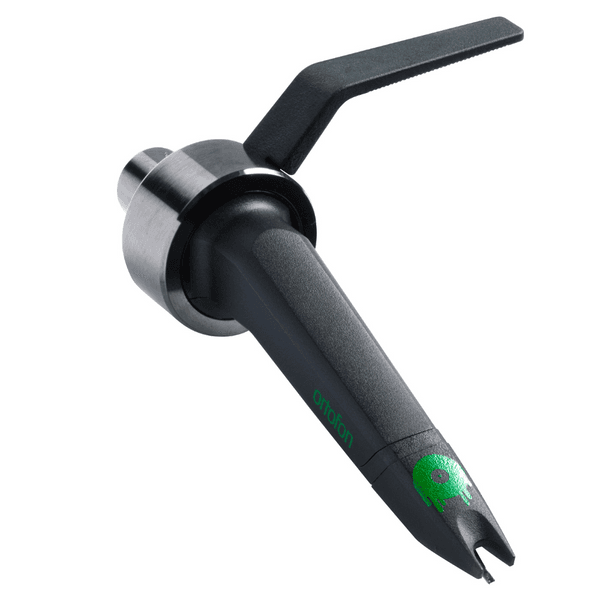
Shown: Mix. Plugs straight into the arm, no headshell. Check that the body and the stylus are both MkII.
Photo © Ortofon · model reference ↗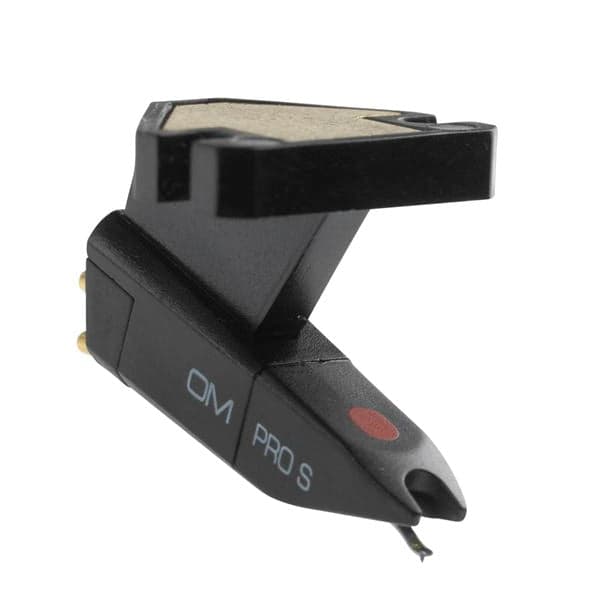
Shown: OM Pro S. OM mounts on a headshell; the older Concorde plugs straight into the arm. Note the suffix: S, E or MKII.
Photo © Ortofon · model reference ↗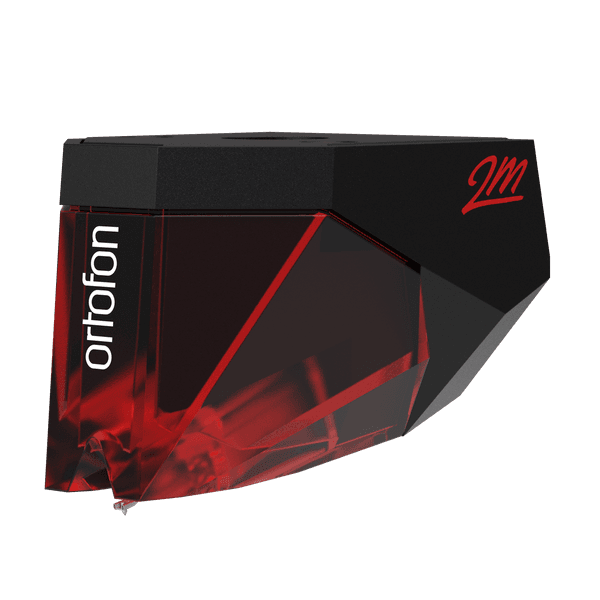
Shown: 2M Red. The color of the removable front tells you the stylus. The box confirms it.
Photo © Ortofon · model reference ↗Concorde MkI and MkII styli don't interchange. Within a generation Ortofon wants the model matched: a Mix stylus on a Scratch body isn't a supported pairing. The exceptions are S and E swaps within the older DJ and Night Club series. Ortofon DJ FAQ · interchangeability ↗
| Body + stylus / source | Range (g) | Recommended (g) |
|---|---|---|
| MkII Mix + Mix ↗ | 2–4 | 3 |
| MkII DJ + DJ ↗ | 3–5 | 4 |
| MkII Club + Club ↗ | 2–4 | 3 |
| MkII Scratch + Scratch ↗ | 3–5 | 4 |
| MkII Digital + Digital ↗ | 3–5 | 4 |
| MkII Elite + Elite ↗ | 2–4 | 3 |
Club uses a special elliptical tip. Elite uses a nude elliptical tip and is intended for listening, not heavy back-cueing or scratching. Club specification ↗ Elite usage guidance ↗
Match each stylus to its corresponding DJ model. These are the recommended settings in Ortofon's replacement guide, which does not list minimum and maximum forces. Night Club MKII appears in this legacy family; it is not the Concorde MkII Club above. Ortofon legacy guide · diagram & table ↗ OM / Concorde bodies & allowed S / E swaps ↗
| Fitted stylus / source | Recommended (g) |
|---|---|
| Pro ↗ | 4.0 |
| Pro S ↗ | 4.0 |
| DJ S ↗ | 3.0 |
| DJ E ↗ | 3.0 |
| Night Club S ↗ | 3.0 |
| Night Club E ↗ | 3.0 |
| Night Club MKII ↗ | 3.0 |
| Scratch ↗ | 4.0 |
| White ↗ | 4.0 |
| DigiTrack ↗ | 3.0 |
| DigiTrack Limited ↗ | 3.0 |
| Elektro ↗ | 4.0 |
| Arkiv ↗ | 3.0 |
| MFS ↗ | 4.0 |
| Gold ↗ | 3.0 |
| Q.Bert ↗ | 3.0 |
| Q.Bert Gold Anniversary ↗ | 3.0 |
| Cocoon ↗ | 3.0 |
Ortofon lists three interchange groups: Red / Blue / Silver; Bronze / Black / Black LVB 250; and Mono / 78. Every body in a listed group can take the styli in that group. For example, a Blue stylus on a Red body uses the Blue row. 2MR uses the corresponding 2M styli. Ortofon 2M interchange groups ↗ 2MR compatibility ↗
Color: Red.
2M body group: Red / Blue / Silver.
1.8 g recommended · 1.6–2.0 g range
Ortofon photo & stylus specification ↗Color: Blue.
2M body group: Red / Blue / Silver.
1.8 g recommended · 1.6–2.0 g range
Ortofon photo & stylus specification ↗Color: Translucent.
2M body group: Red / Blue / Silver.
1.8 g recommended · 1.6–2.0 g range
Ortofon photo & stylus specification ↗Color: Bronze.
2M body group: Bronze / Black / Black LVB 250.
1.5 g recommended · 1.4–1.7 g range
Ortofon photo & stylus specification ↗Color: Black.
2M body group: Bronze / Black / Black LVB 250.
1.5 g recommended · 1.4–1.7 g range
Ortofon photo & stylus specification ↗Color: Black; confirm LVB 250 model.
2M body group: Bronze / Black / Black LVB 250.
1.6 g recommended · 1.5–1.7 g range
Ortofon photo & stylus specification ↗Color: White.
2M body group: Mono / 78.
1.8 g recommended · 1.6–2.0 g range
Ortofon photo & stylus specification ↗Color: Gray.
2M body group: Mono / 78.
1.8 g recommended · 1.6–2.0 g range
Ortofon photo & stylus specification ↗Mono and 78 share a body group but not records: the 78 stylus has a 65 µm tip, against 18 µm for Mono. 2M 78 specification ↗ 2M Mono specification ↗
Concorde Music, VNL and the MC models aren't covered here. Use their own manuals. Ortofon manuals & support ↗
The arm can only balance a certain mass, and the fix differs at each end: a heavy cartridge needs the auxiliary weight, a light one needs the shell weight. Panasonic publishes the exact ranges.
Ranges from the SL-1200MK2 specification.
Pick a cartridge and get the numbers for this arm: tracking force, anti-skate, which counterweight fitting to use, and where the cartridge and arm resonate together. The arm figures are Panasonic's, the cartridge figures are each maker's own.
Manufacturer specifications: [1] Ortofon
Counterweight: Balance weight alone. Panasonic's range for that fitting is 13.5 to 17.5 g including the headshell.
Inside the 8 to 12 Hz window, clear of warp frequencies below and the audio band above.
Effective mass here is 12 g, which is Panasonic's figure including the headshell and without a cartridge, quoted on page 8 of the SL-1200MK2 instructions. This is worth stating plainly because it is commonly got wrong: adding the 7.5 g headshell on top of the 12 g overstates effective mass by more than a third and drags every resonance figure down with it. A Concorde-shaped body replaces the headshell rather than sitting in it, so for those the 7.5 g comes back off.
Everything downstream (tracking, anti-skate, pitch stability) assumes a level platter. Use the damped feet and a bubble level before touching the tonearm.[1] Panasonic MK2 manual
Balance the arm so it floats level, hold the counterweight still while zeroing the calibration ring, then set tracking force to the specification for the fitted stylus. Recheck after changing styli. Technics is explicit: set the anti-skating knob to the same number as the stylus pressure. Scratch DJs commonly run it at zero instead.[1] Panasonic MK2 manual[2] The Vinyl Factory
Unlock the arm base first. The ring gives 0–6 mm in 0.5 mm steps, and Panasonic tables it against cartridge height: 15 mm → 0, 16 → 1, 17 → 2, 18 → 3, 19 → 4, 20 → 5, 21 → 6, interpolating between marks. Re-lock when done.[1] Panasonic MK2 manual
The rim carries four rows. Whichever stands still is your speed: row 1 is +6%, row 2 +3.3%, row 3 normal 33⅓ or 45, row 4 −3.3%. The strobe is an LED locked to the quartz frequency, so it stays accurate under any lighting.[1] Technics operating instructions
The electronic brake does not work if the power switch goes off before the start/stop button is pushed, the platter coasts down instead. Powering on always reselects 33⅓, so press 45 each time you want it.[1] Technics operating instructions
The gap between stylus and record with the cueing lever raised is factory-set to roughly 8–13 mm. A hex screw in the arm lift adjusts it: clockwise lowers, counterclockwise raises. Press the arm lift down while turning or the screw won't move.[1] Technics operating instructions
Verify speed against the strobe dots at 0% (quartz lock). Trim pots VR301/VR302 calibrate pitch range if it drifts. On de-detented models use the reset button, not the slider's visual center.[1] Peter Vis
Wandering speed almost always means a dirty carbon track in the pitch fader (VR303). Clean it with contact cleaner, or replace the fader; part EVBJ05C19ABE, superseded by SFDZ122N11.[1] Peter Vis[2] Teardown video
Hardwired RCA and ground leads on MK2 through M5G eventually crack and fail. Replacement, and the popular self-grounding mod, is standard service work.[1] DJ TechTools forum
Start/stop and pitch calibration, tonearm bearing check, spindle lubrication, board cleaning. A serviced 40-year-old deck plays like new; that's the whole point of a 1200.[1] RepairDJGear[2] DJ Henray Customs
Tonearm bearings smooth, no play or notchiness; pitch accurate against the strobe across the range; no missing underside screws (a sign of hack repairs); RCA plugs; platter wobble; target light.[1] The Vinyl Factory[2] Crossfader